Vantura Shobina: A Hand-Lettered Font for Creative Expression
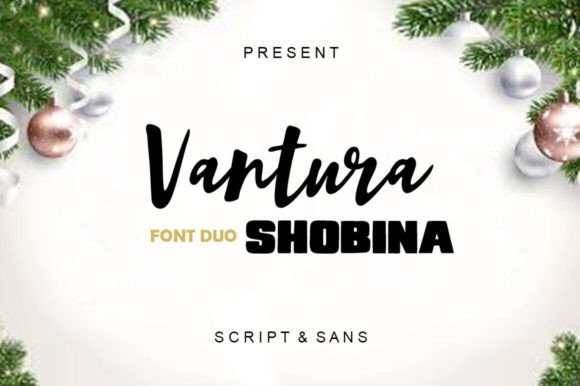
For designers, marketers, and content creators, finding the right font can make all the difference in how a message is received. Vantura Shobina stands out as a unique option that blends handwritten elegance with modern sans-serif charm. This font family offers two distinct styles—script for a personal, artistic touch and sans-serif for clean, professional readability. Whether you're designing logos, crafting social media posts, or creating branding materials, Vantura Shobina provides a versatile solution that caters to both creative expression and practical communication.
What Is Vantura Shobina?
Vantura Shobina is a hand-lettered font designed to mimic the natural flow of human handwriting. It includes two main styles: one featuring fluid, cursive script letters ideal for invitations, quotes, and artistic designs, and another with cute, rounded sans-serif characters perfect for digital interfaces, headlines, and casual text. The font also supports numerals, punctuation, and ligatures, making it suitable for a wide range of typographic needs.
The inclusion of many punctuation marks and ligatures adds a level of realism that sets this font apart from more generic options. This attention to detail helps create a more authentic, handcrafted look that resonates with audiences looking for personality in their visual content.
Common Mistakes When Using Vantura Shobina
While Vantura Shobina is an excellent choice for many projects, some users may encounter issues if they don’t consider its characteristics carefully. Here are a few common mistakes and how to avoid them:
- Misusing the Script Style for Long Texts: The script style of Vantura Shobina is best suited for short phrases or headings. Using it for long paragraphs can reduce readability and cause eye strain. Instead, pair it with a sans-serif font for body text.
- Ignoring Ligature Support: Many users overlook the ligatures included in the font, which are combinations of characters that appear as a single glyph. These enhance the hand-lettered feel but require proper rendering support in design software. Always check your application's settings to ensure ligatures display correctly.
- Choosing the Wrong Weight for the Context: The script style has a delicate appearance, which may not be appropriate for formal or high-contrast environments. Evaluate the context before using it in presentations, reports, or official documents.
How to Choose Between Script and Sans Styles
Selecting the right style of Vantura Shobina depends on the purpose of your project. For example:
- Script Style: Ideal for wedding invitations, greeting cards, blog headers, and promotional banners where a personal or artistic touch is desired.
- Sans Style: Best for websites, mobile apps, infographics, and any digital medium requiring clarity and quick readability.
Consider the audience and the message you want to convey. A playful, whimsical tone suits the sans-serif style, while the script version works well for more expressive or decorative contexts.
Practical Tips for Using Vantura Shobina Effectively
To get the most out of Vantura Shobina, follow these practical tips:
- Test Before Committing: Always preview the font in your design software before finalizing your project. Check how it looks at different sizes and on various backgrounds.
- Use Proper Kerning: Handwritten fonts can sometimes have uneven spacing between letters. Adjust kerning manually to ensure a balanced and professional appearance.
- Limit Color Usage: While Vantura Shobina can be used with colored text, overusing color may distract from the font’s natural aesthetic. Stick to one or two complementary colors for the best results.
Real-World Examples of Vantura Shobina in Action
Here are a few examples of how Vantura Shobina can be applied in real-world scenarios:
Example 1: A boutique coffee shop uses the script style for their logo and menu headers to give off a warm, artisanal vibe. The sans-serif style is used for pricing and descriptions to maintain legibility.
Example 2: A blogger incorporates the script style into their website header and call-to-action buttons to add a personal touch, while using the sans-serif version for article titles and body text.
Example 3: An entrepreneur creates a social media campaign using the script style for captions and quotes, ensuring the brand feels approachable and visually engaging.
Final Thoughts on Vantura Shobina
Vantura Shobina is more than just a font—it's a tool for creative expression that bridges the gap between traditional calligraphy and modern typography. By understanding its strengths and limitations, you can use it effectively across a variety of platforms and purposes.
Whether you're a beginner or a seasoned designer, taking the time to evaluate your choices and avoid common pitfalls will help you achieve better results. With the right approach, Vantura Shobina can elevate your designs, enhance your communication, and leave a lasting impression on your audience.